Blog
Two Kinds of AI, One Feature: Building a PDF Import Around What the User Actually Wanted
I interviewed a prospective user of an app I build, and I asked how he would want to load his list of songs into it. His answer set the whole design: "I would upload the PDF I already send out, if I do not have to change it."
That is the part worth remembering. The feature that follows uses two different kinds of AI, but the AI was not the point. The point was that I listened to what the user already does, kept it, and put the technology behind it so his habit did not have to change. This post is how I built that, and a few other ways the same pattern earns its keep for a business.
The short version
Reliable, task-specific AI does the extraction. A language model does the flexible interpretation. Each is used where it is the right fit, with a human check before anything is saved.
Start with the user, not the tool
In the app, an organizer loads a list of songs for each session. The person I talked to did not want a new form to fill in or a spreadsheet template to match. He had a PDF he already produces, and he wanted to hand that over as-is.
So the design goal was not "add an AI feature." It was "let him keep uploading his PDF, and make the app do the work of understanding it." Same action for him, smarter handling behind it.
Why this needed AI at all
My first version did not use AI. It pulled the raw text out of the PDF with a library called PdfPig, then used regular expressions to pick out each song. It was brittle. There were too many format variations and delimiters, and getting the values right every time turned into an endless pile of special cases.
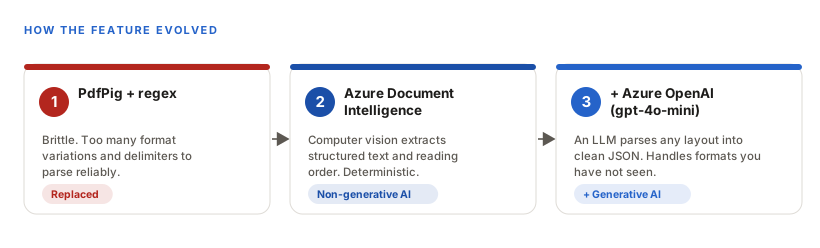
The fix came in two moves: a better extractor, and then a smarter parser.
Two kinds of AI, each where it fits
It helps to separate the two jobs, because they call for different tools.
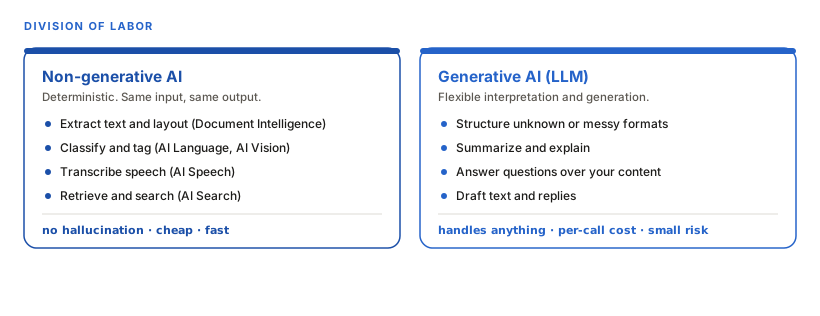
Non-generative AI is deterministic. The same input gives the same output, there is no hallucination, and it is cheap and fast. Azure AI Document Intelligence is that kind of tool: a pre-trained computer vision model that reads a document's layout, columns, and reading order, and returns structured text. That is the hard part regex could not do reliably.
Generative AI, a language model, is the opposite. It is flexible and can interpret text it has never seen in a format nobody wrote code for, at a small per-call cost and a small risk of getting something wrong.
What I actually built
There are two import paths on the same page, and both start with Document Intelligence pulling the text out of the PDF.
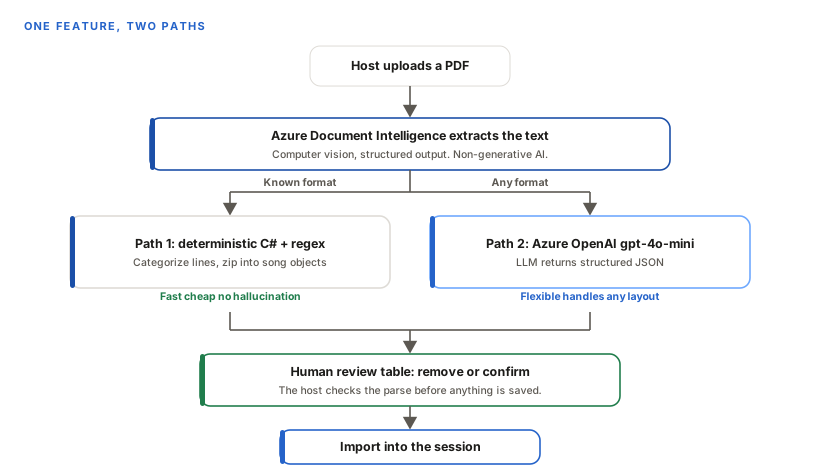
For the format I already know, path one parses the extracted text with plain C# logic. It is fast, it costs nothing beyond the extraction, and it cannot hallucinate.
For anything else, path two sends the extracted text to Azure OpenAI (gpt-4o-mini) with a system prompt that tells it to return only a JSON array of songs, each with key, title, cover artist, original artist, and year. Constraining the output to strict JSON is deliberate: it keeps the model on task and lowers the chance of invented text. That path handles PDFs I have never seen, which is exactly what the host needs when he changes his format without thinking about it.
Both paths end at the same place: a review table. The host sees what the AI parsed and can remove any wrong rows before confirming. This step matters because a language model is not guaranteed to be right. In my testing it got about 13 of 14 songs, and the same PDF can miss differently on different runs. The human check gives clean data without needing the AI to be perfect.
What this costs, which is less than you would think
This is the part that surprises people. Both services bill by usage, and at the volume a small business actually runs, the bill stays at or near nothing.
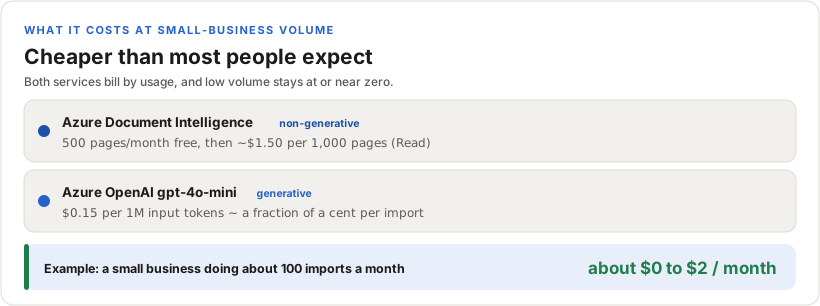
Azure AI Document Intelligence includes 500 pages a month at no charge, and after that the Read model runs about $1.50 per 1,000 pages. Azure OpenAI gpt-4o-mini is about $0.15 per million input tokens, and a setlist is small, so each parse costs a fraction of a cent. A business processing a few dozen or a few hundred documents a month often sits inside the free tier for extraction and spends pocket change on the language model. Costs only start to matter at high volume, and even then they scale in cents per document, not dollars. For a small business weighing whether "AI" is affordable, that is the answer: at your scale, it usually is.
Where this same pattern could help your business
The example above is a music app, but the shape is general: let reliable AI extract or retrieve, let a language model interpret or generate, and keep a human in the loop where accuracy matters. The same approach fits a lot of everyday business tasks that involve messy documents, images, calls, or repetitive input.
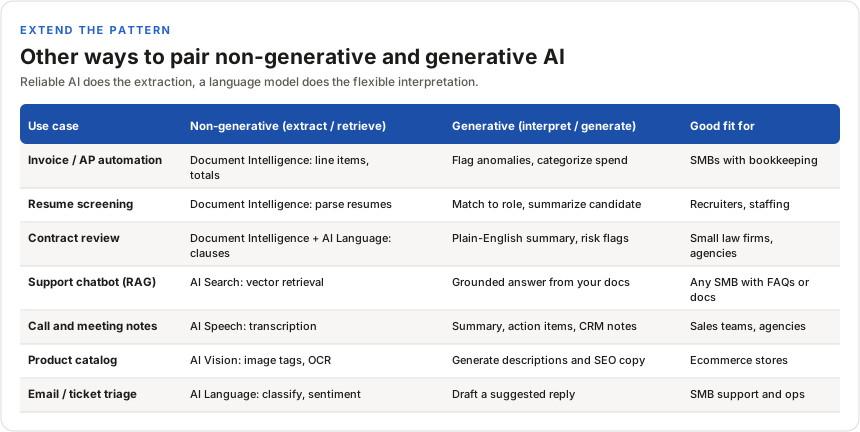
Each row is the same idea as the setlist import. Something dependable does the mechanical extraction or retrieval, and a language model adds the flexible layer on top. Which Azure service does the first job changes with the input: Document Intelligence for documents, AI Vision for images, AI Speech for audio, AI Search for retrieval, AI Language for classification.
The takeaway
The interesting part of this feature is not the models. It is that I started from what one user already does and worked backward to the tools, instead of picking a shiny tool and making him adapt. The AI is only good here because it disappears behind his existing habit.