Blog
Event Tracking in Google Analytics: What It Costs, and What's Worth Tracking
In what your website report actually proves, I said the section that matters most is conversions, the part that shows visitors turning into leads. That is true. It is also the part that takes real work, and honestly, most of it is not worth doing for a small business.
Page views track themselves. A conversion does not. Setting up event tracking in Google Analytics means defining what counts, wiring it up, testing it, and maintaining it as the site changes. That is time and cost. So the useful question is not "should I track everything," it is "which few things are worth the effort." For most small businesses, the answer is short.
Track what maps to a dollar, skip the rest
The events worth setting up are the ones that represent money: a lead or a sale. Everything else tends to produce more data without more insight.
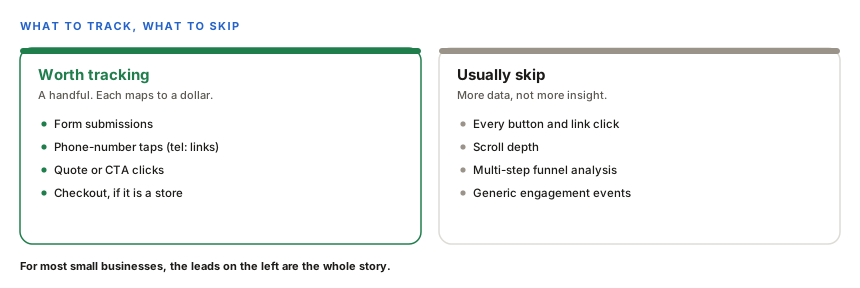
A plumber does not need a funnel analysis. They need to know the phone rang and the contact form got filled in. That is two or three events, and once they are tracked, the report can say "the site produced this many leads this month." Tracking every click and scroll on top of that adds noise you will never act on.
Why it is more work than page views
This is the part people underestimate. A page view is automatic, Google Analytics records it out of the box. A conversion is a small project.
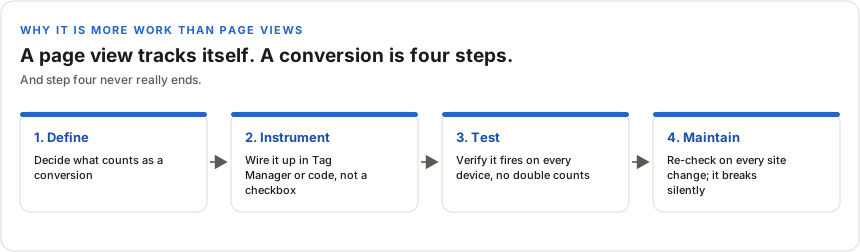
Each step is real:
- Define. You decide precisely what a conversion is. A form submit? Only a successful one? A call tap on mobile?
- Instrument. You wire it up, usually through Google Tag Manager or in code. It is not a setting you flip on.
- Test. You confirm it actually fires, on desktop and mobile, without double-counting or missing submissions. Forms are especially fiddly, because a submit can be an AJAX call or a redirect to a thank-you page, and each is tracked differently.
- Maintain. Here is the one nobody mentions. When the site changes, a new form, a redesigned button, the tracking can silently stop working, and nobody notices until a report looks wrong. So it needs re-checking whenever the site changes.
That is why event tracking costs more than page-level analytics. It is setup plus testing plus ongoing maintenance, not a one-time toggle.
The honest payoff
Here is where I will be straight with you, because I have built this and watched it underdeliver. The test for whether a metric is worth tracking is simple: will you actually act on it? If a number will not change a decision, tracking it is effort spent on a chart nobody reads.
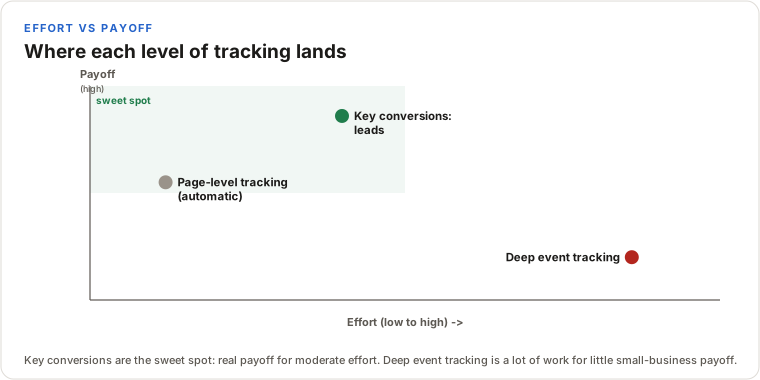
Key conversions are the sweet spot: moderate effort, real payoff, because a lead count is a number you will act on. Deep event tracking, every interaction captured and funneled, is a lot of work for a payoff most small businesses never use. I set up detailed event tracking on a project of my own and found the extra data did not change a single decision. That is the tell. More tracking is not more insight.
This is judgment, not a limitation
To be clear, this is not "event tracking is bad" or "I can't do it." I can set up as much tracking as you want, and sometimes it is genuinely worth it, a store optimizing checkout, a business running paid ads that needs to measure each campaign. The point is that it is a real, scoped piece of work with a real cost, so it should be a deliberate choice, not a default. Most of the time, tracking the handful of events that equal a lead gives a small business everything it needs, and I would rather tell you that than bill you for a funnel you will never open.
Bottom line
Event tracking is worth it for the few events that map to money, and rarely worth it beyond that for a small business. Track your leads, skip the noise, and spend the difference on something that moves the needle.