Blog
Google Analytics vs Cloudflare: What Your Website Report Actually Proves
Most website analytics gets treated as a dashboard you glance at once a month: traffic up, good, close the tab. That is a waste of it. Analytics is worth having only if the numbers prove something specific about what your website is doing for your business. Traffic by itself proves nothing. The right numbers, tied to the right claims, prove everything.
There are two free tools people reach for, Cloudflare Web Analytics and Google Analytics, plus a third, Google Search Console, that quietly does the most important part. They are not competitors. They measure different things and prove different claims. This post is what each one proves, whether you need more than one, and how to read a report so the numbers actually mean something.
First, the mindset: interesting versus proof
The single most useful habit is to sort every metric into one of two piles.
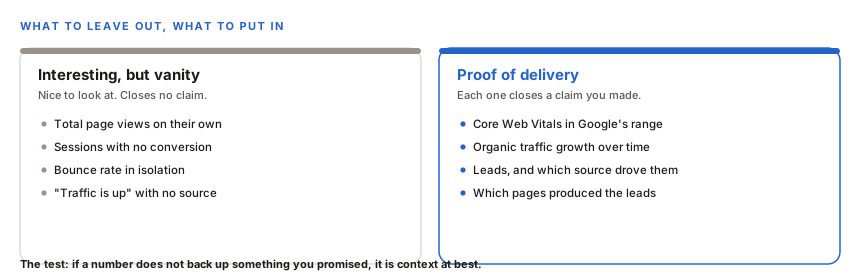
Page views are the classic vanity number. They feel like progress and prove nothing on their own. A conversion, a lead from organic search, a page-speed score in Google's target range: those close a specific claim. When you read a report, ask of every number, "what does this prove?" If the answer is nothing, it is filler.
Which tool proves what
Here is the part that answers "do I need both." Cloudflare and Google Analytics are not doing the same job, and neither is Search Console.
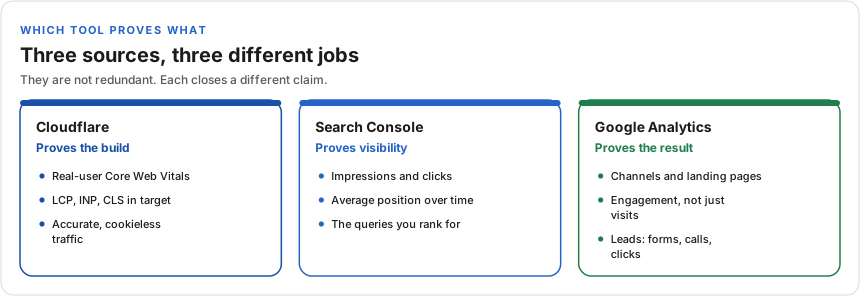
- Cloudflare Web Analytics proves the build is fast. It captures Core Web Vitals from your real visitors, the same real-user speed data Google uses when it ranks you. It is cookieless, so it needs no consent banner, and it is light, so it does not slow the site. What it does not do is track conversions or campaigns.
- Search Console proves you are getting found. It is the most direct SEO evidence there is: how often you appear in search, how often people click, your average position, and the exact terms you rank for. Neither Cloudflare nor Google Analytics shows this.
- Google Analytics proves the result. It is the deep one: where visitors come from, which pages pull them in, and, most importantly, whether they turned into leads. This is where conversions live.
So do you need both Cloudflare and Google Analytics? If all you want is an accurate, private count of who visited and how fast the site is for them, Cloudflare alone is enough. The moment you want to know whether visitors became customers, Google Analytics earns its place, because Cloudflare cannot see a conversion. Most businesses that care about results end up with all three, because each closes a claim the others cannot.
The proof chain
Read a good report as a chain, not a pile of charts. Each link proves the previous promise held.
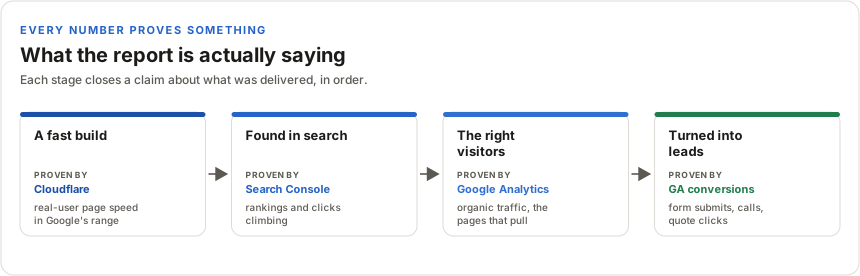
Walking it:
- A fast build. Cloudflare shows your real visitors experience the site loading in Google's target range (LCP, INP, CLS). This is not a promise that the site is fast. It is proof, from real users, in the exact data Google grades on. When someone builds your site and says they know how to make it fast, this is what backing that up looks like.
- Found in search. Search Console shows impressions, clicks, and position climbing, and the queries driving it. That is the SEO work landing.
- The right visitors. Google Analytics shows the traffic is organic and relevant, and which pages are doing the pulling.
- Turned into leads. Google Analytics conversion tracking shows the form submissions, phone taps, and quote-button clicks. This is the one that matters, because it is the sentence a business owner actually wants: "the site produced this many leads this month, and here is where they came from."
That last link only exists if conversion tracking is set up. Google Analytics does not record a form submission or a call tap by default. Without that setup, a report can show speed, rankings, and traffic, but it cannot prove leads, and leads are the point. Setting it up is more involved than it looks, so it is worth knowing what event tracking actually costs and which events are worth tracking before you pay for all of it.
Read the numbers honestly
Two things belong in any report, because saying them builds trust rather than undermining it.
First, the totals are undercounted. Ad blockers and privacy settings stop a slice of visitors from being recorded, which is why Cloudflare and Google Analytics rarely match. Cloudflare, measured at the edge, tends to be the truer count. That is not an error, it is the nature of web analytics, and it is better to say so than to pretend the numbers are exact.
Second, analytics shows correlation, not causation. A report can show that traffic rose after a change. It cannot prove the change alone caused it. Good reporting states what moved and what was done, and leaves the honest gap where it belongs.
Bottom line
Analytics is only useful when the numbers prove something. Cloudflare proves the build is fast, in the data Google ranks on. Search Console proves you are getting found. Google Analytics proves whether visitors became leads. Read together, as a chain, they turn "your site is doing well" from a claim into something you can see for yourself.